GIF Background Remover
Remove the background from an animated GIF and get a transparent GIF that still moves, or put it on a new color. Free, automatic and private: your GIF never leaves your device.
Your file
Drop an animated GIF hereTap to choose an animated GIF
GIF
Before and after: a GIF with its background removed
This 16-frame GIF went through the tool exactly as yours will. Every frame was cut out automatically; nothing was retouched by hand.

Original GIF 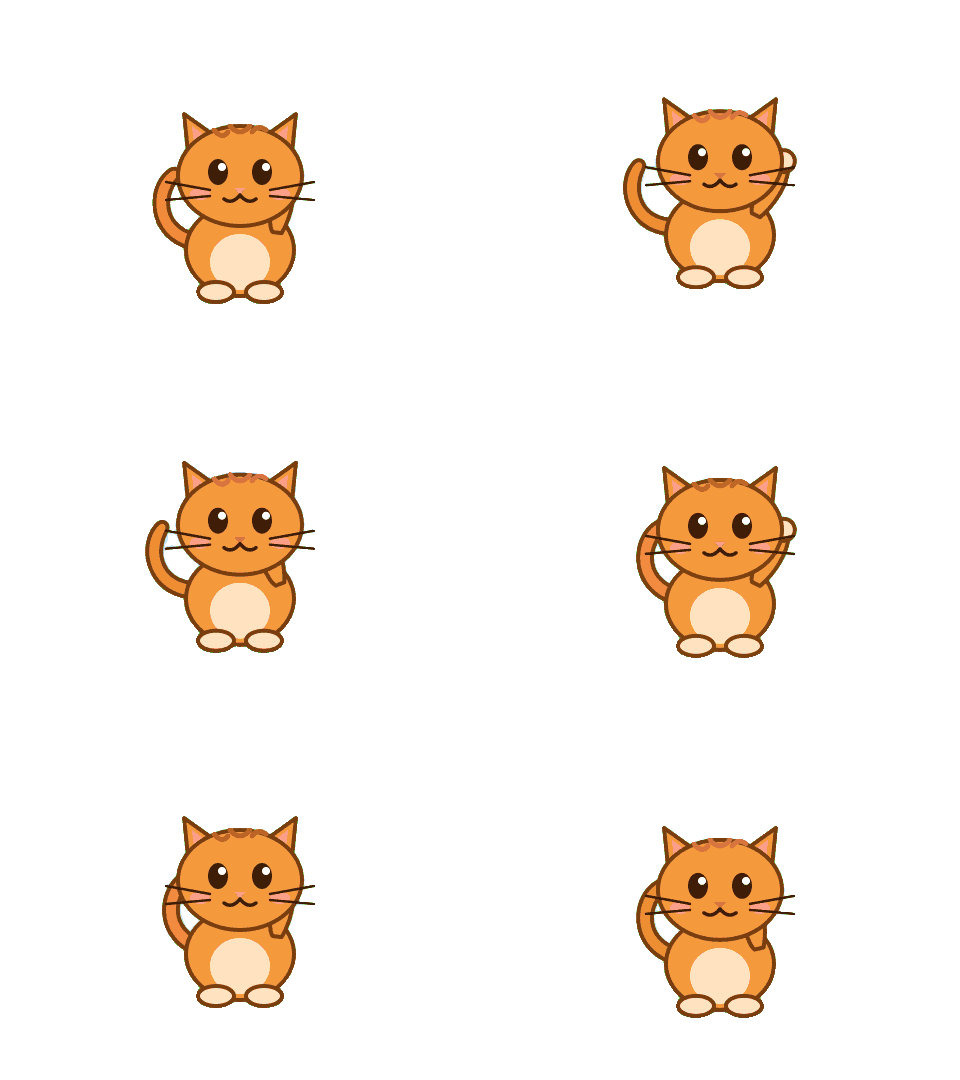
Transparent GIF On a new background
The animation was drawn for this demonstration. The result is the tool's own output, unedited.
Why use this tool
No file size limit
Full-size photos and long documents, straight from your device.
Nothing is uploaded
Processed entirely in your browser. Your files never leave your device.
No signup needed
Open the tool and go. No account, no email.
Removing the background from a still image is one cut-out. An animated GIF needs a cut-out for every frame, and they have to agree with each other or the edge flickers as the loop plays. Doing that by hand, magic wand on frame after frame, is why most people give up on making a GIF transparent.
This background remover for GIF animations does it automatically. An AI model running in your browser finds the subject in each frame, the frame timing and loop are kept, and you download a transparent GIF ready for Discord, Slack, a video edit or a web page. Need a solid backdrop instead? Pick white, black or any color before you download.
How to remove the background from a GIF
Add your GIF
Drop an animated GIF on the box above, or choose one from your phone or computer. The AI model starts loading as soon as the page opens, so it is usually ready by the time you pick a file.
Let every frame process
Nothing to press: processing starts as soon as the GIF is added. A bar counts the frames as they go, because every frame is a separate pass of the model.
Download a transparent GIF
Check the result on the checkerboard, choose a background color if you want one, fix any frame with Erase or Restore, then download.
Make a GIF transparent without a green screen
A transparent GIF is an animation whose background pixels are see-through, so the subject sits directly on whatever is behind it: a chat window, a slide, a web page or another video. That is what a transparent GIF maker produces, and it is what this tool gives you from an ordinary GIF.
Most online tools that make a GIF transparent work by deleting one color. They are fine when the background is a single flat shade and useless when it is a room, a street or a gradient sky. This tool does not look for a color at all. It segments the subject in every frame, so it works on clips filmed in real places, on cartoons and stickers, and on memes cut from video.
Call it a transparent GIF maker, a GIF background eraser or a transparent GIF converter: the job is the same, and here it is free, with no watermark on the result. It handles still GIFs too. A single-frame GIF is processed the same way and comes back as a GIF; if you want soft, anti-aliased edges on a still picture, the image background remover saves a PNG instead.
In short, it is a background GIF remover that works like an image cutter, but for every frame at once: remove the GIF bg, keep the animation, and download the result.
Remove green screen from a GIF, or a white background
Green-screen GIFs, white-background stickers and product loops on a studio backdrop are the easy cases: the subject stands out clearly, so the model separates it cleanly. You do not need to pick the green or tell the tool which color to remove.
To remove a green screen from a GIF, just add it like any other file. Two things to check on green-screen footage. Green light reflects onto hair and edges, so a thin green rim can stay on the subject; use Erase with a small brush on the frames where it shows. And anything green on the subject itself is still the subject here, because the model judges shape and context, not color.
A white background is the opposite problem: white parts of the subject, such as a shirt or a cat's chest, can blend into it. Look through a few frames after processing and use Restore wherever part of the subject went missing.
Add background to a GIF
After the background is removed you can put the animation on a solid color instead of leaving it transparent. Pick white, black or any color under Background before you download, and the color is written into every frame.
This is the better choice when the GIF is going somewhere that does not show transparency well. Some apps convert GIFs to video when you send them, and video has no transparency, so the see-through areas turn black or white unpredictably. A background you chose avoids that surprise. If the GIF will end up as a video anyway, the GIF to MP4 converter does it with the background color you pick.
Choosing a color that matches the page or chat where the GIF will appear also hides the light fringe a transparent GIF can show on dark backgrounds. For a photo or pattern behind the animation, download the transparent GIF and place it over that image in your video, slide or design editor.
Why transparent GIF edges look sharper
GIF transparency is one bit. Every pixel is either fully see-through or fully solid; there is nothing in between. Soft edges, wisps of hair and motion blur cannot fade out gradually the way they do in a PNG, so the outline of a transparent GIF is crisper and can look slightly jagged. Every GIF background remover has this limit, because it is part of the GIF format.
The same limit explains the white halo you may have seen around transparent GIFs. Edge pixels that were blended with a light background stay light, and they show up as a thin outline on a dark page. The fixes are to add a background color that matches where the GIF will be used, or to trim the outline with Erase.
If soft edges matter more than animation, save a single frame as a PNG with the image background remover. The background removal guide explains when each format is the right one.
GIF background removal on phones: speed and limits
The model looks at each frame on its own, so a 40-frame GIF is 40 passes. On a recent laptop a short sticker or reaction GIF usually takes a few seconds; on an older phone a long one can take a minute. The frame counter shows real progress, so you are never guessing.
The tool processes up to 60 frames per GIF. If yours is longer, the result says how many frames were left out, and the rest keep their original timing and loop setting.
It works in current mobile browsers, including Safari on iPhone and Chrome on Android, with nothing to install. The AI files, about 17 MB, download once and stay in the browser for your next GIF.
Your GIF is never uploaded
The frames are decoded by your browser, the model runs on your own device and the new GIF is encoded there too. There is no server in the loop, which is also why there is no queue, no watermark and no daily limit.
That matters for this kind of file. A GIF is often a person: a reaction clip, a selfie loop, someone on a video call. Those are exactly the files worth not handing to a stranger's server.
Transparent GIF vs PNG vs animated WebP
Which transparent format to use, and where each one works.
| Feature | Transparent GIF | Transparent PNG | Animated WebP |
|---|---|---|---|
| Animation | Yes, timing and loop kept | No, a single frame | Yes |
| Transparency | On or off per pixel | Smooth, 256 levels | Smooth, 256 levels |
| Edges | Crisp, can look jagged | Soft and clean | Soft and clean |
| Colors | Up to 256 per frame | Millions | Millions |
| Where it works | Almost everywhere, including chat apps and email | Almost everywhere, as a still | Browsers and some apps |
| Make it here | This page | Image background remover | Not supported here |
What a transparent GIF is for
Custom emoji and stickers
Discord, Slack and Telegram show a transparent GIF on the conversation itself instead of inside a colored box.
Twitch alerts and stream overlays
Animated alerts and overlays in OBS or Streamlabs sit on top of the game or camera with no rectangle around them.
Video edits
Drop the animation straight onto footage in your editor, with no green screen to key out afterwards.
Websites and emails
A moving logo, badge or product loop over a colored or patterned section, without a white block around it.
Slides and presentations
PowerPoint, Keynote and Google Slides play the GIF over your slide design.
Memes and reaction GIFs
Cut the person or pet out of a clip and put it on a new color, or into another scene in your editor.
Frequently asked questions
- Is this GIF background remover free?
- Yes, completely. No account, no trial, no watermark and no daily limit. The work happens on your own device, so there are no processing costs to pass on.
- How do I remove the background from a GIF online?
- Add the GIF to the box at the top of this page to make the GIF background transparent. Every frame is processed automatically, and you download a transparent GIF that still animates. You can fix individual frames with Erase or Restore before downloading.
- Does the GIF keep its animation and speed?
- Yes. Up to 60 frames are processed with their original frame delays and loop setting, so the transparent GIF plays at the same speed as the original.
- Can I remove a green screen or a white background from a GIF?
- Yes. The tool finds the subject rather than a color, so green, white and busy backgrounds are all removed the same way. On green-screen clips, check for a thin green rim on hair and edges and trim it with Erase.
- Can I add a background to a GIF?
- Yes. After processing, choose white, black or any color under Background and download; the color is added to every frame. To put an image or video behind the animation, download the transparent GIF and combine them in your editor.
- Why does my transparent GIF have a white or jagged edge?
- GIF transparency is all or nothing per pixel, so edges cannot fade out softly, and edge pixels blended with a light background stay light. Choose a background color that matches where the GIF will appear, or trim the edge with Erase. For soft edges on a still image, use the image background remover to get a PNG.
- Is my GIF uploaded to a server?
- No. The frames are decoded, the model runs and the new GIF is written entirely in your browser. The file never leaves your device.
- Can I remove a GIF background on iPhone or Android?
- Yes. Open this page in Safari, Chrome or another current mobile browser; there is no app to install. A long GIF takes longer on a phone than on a laptop.
- Can I use the transparent GIF on Discord, Slack or Twitch?
- Yes. All three accept animated GIFs with transparency for custom emoji, stickers or alerts. Each platform has its own size and dimension limits, so check them before uploading. The GIF to emoji tool resizes and compresses a GIF to fit each one.
- Can I remove the bg from a GIF without an app or watermark?
- Yes. The GIF bg is removed right here in the browser, free, and the downloaded GIF has no watermark or logo on it.
- How long can the GIF be?
- The tool processes up to 60 frames. Extra frames are left out, and the result shows how many were omitted.
- Can I remove the background from a video or MP4?
- Not here. This tool reads GIF frames only. Converting a short clip to GIF first is the usual route. The GIF maker turns a short MP4, MOV or WEBM clip into a GIF in a few clicks.
- What is the difference between this and the image background remover?
- This page keeps every frame of an animation and saves a GIF. The image background remover handles photos and saves a PNG with soft, semi-transparent edges, which looks better when you only need a still.
From the blog
All articles
Related tools
Remove Background
Remove backgrounds from photos or animated GIFs on your device. Refine with Erase and Restore, then download a transparent PNG or GIF.
Crop Image
Crop freely, in a circle or to 1:1, 16:9, 9:16, 4:3, 3:4, 3:2, 2:3 or 4:5 — transparent PNGs stay transparent.
Resize Image
Set exact pixel dimensions or scale a photo by percentage.
Compress PNG
Cut PNG file size by up to 80% and keep the transparency.
Image to WEBP
Convert JPG, PNG, HEIC or AVIF to WEBP for lighter web pages.
Image to PNG
Convert JPG, WEBP, HEIC or AVIF to lossless PNG, transparency kept.